So you are creating a pivot after upgrading and then when you save the file, you get an error that the file cannot be accessed and it refers to an excel file in the folder of the older version of Dynamics GP.
What to do:
- Change the Server name in the Pivot window which is Microsoft Dynamics GP>> Tools>> Analysis Cubes>> Create PivotTable Reports.
- Pick back the module/cube
- Click Save.
-This will generate the pivot to the new GP version.
-Now you can click excel icon to open your Pivot.
Thursday, 12 December 2019

Analysis Cubes Upgrade Dynamics GP Error in Cube - Unhandled Object Exception Class not registered
So you have upgraded Analysis Cubes for Dynamics GP and then go into GP to Microsoft Dynamics GP>> Tools>> Analysis Cubes>>Create Pivot Reports and when creating a new pivot, you click save and get an unhandled object exception: class not registered.
This is due to not having excel on the machine you are trying to deploy on. Use another machine.
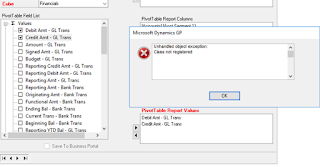
This is due to not having excel on the machine you are trying to deploy on. Use another machine.

Friday, 7 June 2019
SSRS Address is Invalid
The correct address existed, the Configuration Manager could be reached and everything however, my reports could not be deployed.
I removed SSRS Native Feature from my SQL 2016 installation.
I deleted the SSRS Databases in SQL.
I confirmed the log and mdf files were also deleted.
I reinstalled SSRS Native Feature to my SQL 2016.
Configured SSRS in the Configuration Manager - Create SSRS Database, click apply on the web services and other window to register the site.
Run GP as Admin.
SSRS Reports are being deployed!
If this does not work for you it could be due to security. If you are unable to access the site in ie then it means the administrator has not reduced the security on the internet. Thus reduce the security and you should be able to proceed. We had a hard customer so we instead got edge installed, set that as the default web browser, redeployed and it worked. This information is from Skwah #2. Thank you!!
I removed SSRS Native Feature from my SQL 2016 installation.
I deleted the SSRS Databases in SQL.
I confirmed the log and mdf files were also deleted.
I reinstalled SSRS Native Feature to my SQL 2016.
Configured SSRS in the Configuration Manager - Create SSRS Database, click apply on the web services and other window to register the site.
Run GP as Admin.
SSRS Reports are being deployed!
If this does not work for you it could be due to security. If you are unable to access the site in ie then it means the administrator has not reduced the security on the internet. Thus reduce the security and you should be able to proceed. We had a hard customer so we instead got edge installed, set that as the default web browser, redeployed and it worked. This information is from Skwah #2. Thank you!!
Wednesday, 5 September 2018
How to add Nodes in Smartconnect after Installation.
Smartconnect
-After installation of Smartconnect Application
-Register Smartconnect
-Install GP Smartconnect
-Process Cache in GP Smartconnect
-Then go back into Smartconnect application
-Create GP Connector
-Run System Maintenance
-BOOM! Nodes added!
-After installation of Smartconnect Application
-Register Smartconnect
-Install GP Smartconnect
-Process Cache in GP Smartconnect
-Then go back into Smartconnect application
-Create GP Connector
-Run System Maintenance
-BOOM! Nodes added!
Management Reporter - Couldn't retrieve the list of available databases: The connection attempt failed.
You get the error as seen below when trying to deploy the Management Reporter Data Mart under the "Database GP Connection Information" section.
"Couldn't retrieve the list of available databases: The connection attempt failed."
I experienced it with MR CU16 and other persons have experienced with older versions of MR.
What to do:
To resolve the Dexterity Shared Components 12 needs to be installed. You can retrieve this from a GP2013R2 install file.
Once installed you can complete the MR Data Mart deployment.
Thursday, 16 August 2018
Unable to access SQL after straight install from Azure
So you get your new VM and you see SQL installed. You try to connect to SQL and dont know the sa password. So you use the Windows domain account but cannot get in either.
Reason is because the domain may not have been setup yet so you need to connect with the local admin account.
Reason is because the domain may not have been setup yet so you need to connect with the local admin account.
- Thus you sign in to the machine as the local admin account.
- Sign in to SQL.
- Change the Properties to Mixed Mode.
- Then enable the sa user in security.
- Then set the password.
Saturday, 4 August 2018
GP Web Client First Log in - Error Received "A get/change operation on table 'syUserDefaults' failed accessing SQL data dynamics gp"
So you set up web client
Try to log in for the first time and get:
"A get/change operation on table 'syUserDefaults' failed accessing SQL data dynamics gp"
More Info : "The server principal "(username)" is not able to access the database "DYNAMICS" under the current security context."
To Resolve:
- Run grant scripts against Dynamics and Company Databases
-Give your web client sql user account DYNGRP access to DYNAMICS database.
Try to log in for the first time and get:
"A get/change operation on table 'syUserDefaults' failed accessing SQL data dynamics gp"
More Info : "The server principal "(username)" is not able to access the database "DYNAMICS" under the current security context."
To Resolve:
- Run grant scripts against Dynamics and Company Databases
-Give your web client sql user account DYNGRP access to DYNAMICS database.
Subscribe to:
Posts (Atom)